 BRACE · Support
Support: the controls, explained.
Every button below is the real button from the app. Tap-by-tap answers to what people ask. Anything else: 30p@alonetees.com.
Read this first
Warning: bass can do damage.
BRACE is a bass instrument. Much of what it makes is sub-bass: low, powerful and hard for small speakers to handle. Used wrong, it can damage speakers and your hearing.
- Don't play it loud through phone, tablet or laptop speakers. They can't reproduce deep bass. Pushed hard, they distort and can be permanently damaged.
- Use headphones or proper speakers. Wired headphones, studio monitors, or a speaker system with a subwoofer.
- Start with the volume low, then turn it up. Sub-bass can be at a harmful level before it sounds loud.
- On the phone's speaker, keep SPEAKER MODE on. It rebuilds the lowest notes so a small speaker can play them. It is not protection for external speakers or headphones.
- Take breaks. Long sessions at volume damage hearing. Ringing in your ears means stop.
- Never use BRACE to make sound meant to harm, startle or disturb people or animals, or to push speakers, vehicles or buildings past safe limits.
You have been warned. You use BRACE at your own risk. To the extent the law allows, 30P and Alone Tees are not responsible for damage to hearing, speakers, headphones, devices or anything else caused by misuse, excessive volume or unsuitable playback equipment. Your rights under Australian Consumer Law are not affected.
Start in 3 taps
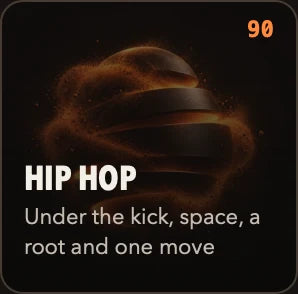
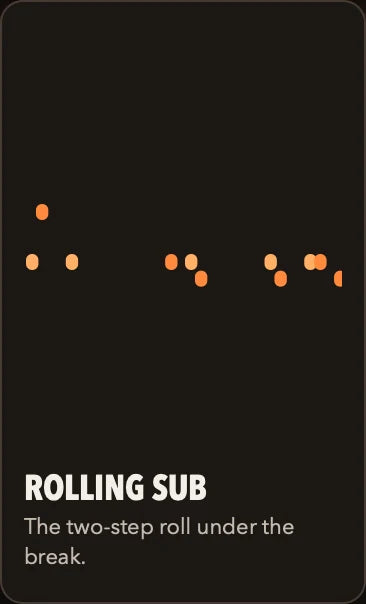
Genre. Part. Play.
Every control
What each button does.
PLAY · top row

Starts and stops the bass. Red means it's playing.

Shows the current voice. Tap to choose from all 34.
The key and scale. Tap to change either. Every note follows.
The chord progression, one chord per bar. AUTO lets BRACE choose.

Saves this part as an Idea you can name. Unlock

Settings, audio and MIDI, export, files, unlock.
Beats per minute. Tap to tap it in, nudge it, or pick 90, 120, 140 or 174.
Records your DILATE moves into the part while it plays. UNDO takes the take back; EDIT shows it.
PLAY · the middle
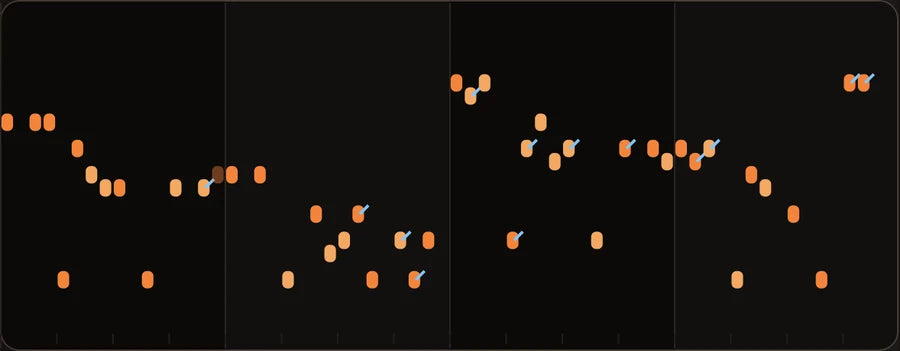
The bass part BRACE is playing. Each dot is a note: higher is higher pitch, left to right is time. Bars are split by lines. When you pick a progression, each bar's chord shows above it. Blue ticks are glides into the next note.
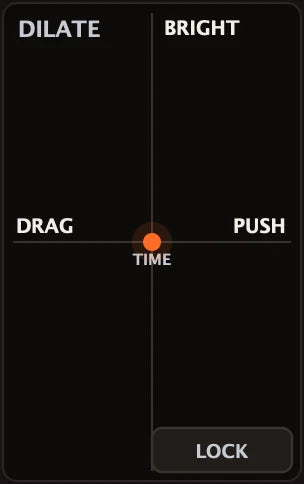
One finger bends the whole line. Left/right = time: DRAG behind the beat or PUSH ahead of it. Up/down = character: BRIGHT or dark. Let go and it springs back to the centre. LOCK holds it where you left it. Double-tap to centre.
PLAY · bottom row

The last change, back. Up to 256 steps.
Puts an undone change back.
A new idea in one tap: a new part, key and progression, sometimes a sister voice. It stays in your genre and keeps your tempo.

Write notes yourself on a key-locked grid. Unlock
Back to the ten genres to start fresh.
Change the part note by note while it plays. Unlock
Move the whole line down or up an octave.
KEY · TEMPO · CHORDS

The note the music is built on. Pick the key your song is in.

Which notes belong. Natural Minor sounds darker, Major brighter. Pentatonic and Blues are the safest.
ON: never a note outside the scale. OFF: BRACE may slip in a note a semitone outside, right before a strong beat, the way a real player does.

Nudge the tempo.
Tap along to a song; BRACE averages your last 5 taps.
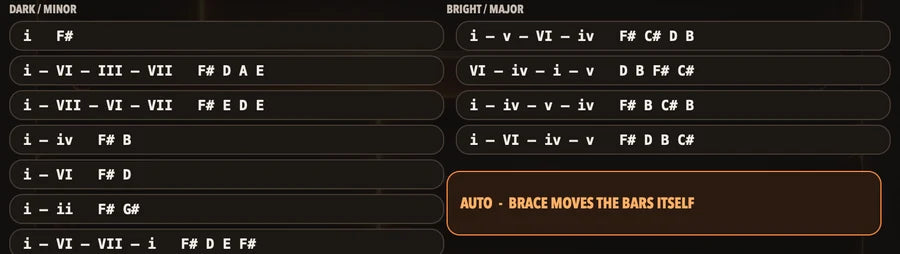
Dark/minor on the left, bright/major on the right. The first note of each bar lands on that bar's chord. AUTO: BRACE moves the bars itself.
VOICE · SHAPE
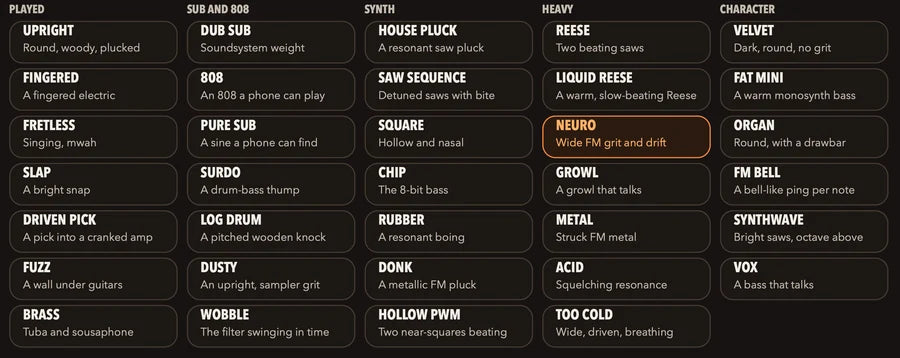
Tap one to change only the sound. The part stays the same. See Synths, explained.

Opens the envelope and EQ for the voice.

How each note moves over time. ATTACK, DECAY, SUSTAIN, RELEASE, explained below.
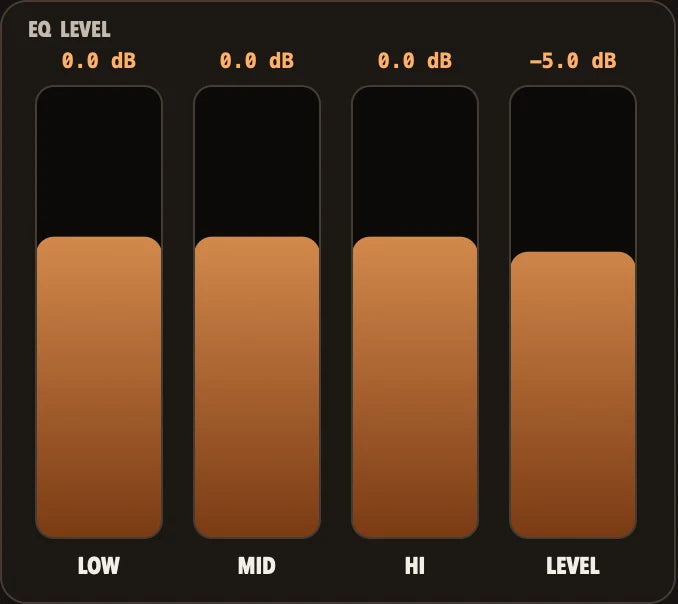
LOW, MID, HI: turn each range down (to −12 dB) or up (to +6 dB). LEVEL: overall volume.
CREATE · EDIT Unlock
A new line to start from.
Pick the progression while you write.

Empties the line to start from nothing.
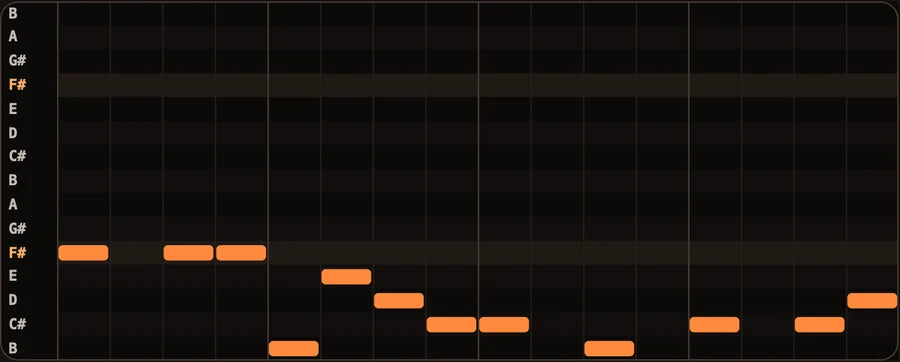
Rows are only the notes of your key, so a wrong note isn't possible. Tap to add a note, tap again to remove it.
Step through the bars.

NOTES: drag to move, tap to delete. VELOCITY: how hard. ACCENT: a punch on that note. GLIDE: slide into the next note. DILATE: your recorded moves.

Removes the recorded DILATE take only.
EXPORT

1, 4, 8 or 16 bars.
The notes as a MIDI file, on the clipboard, for apps that accept a paste. Unlock
The sound as a 24-bit WAV, on the clipboard.
Send your export: AirDrop, Messages, GarageBand, AUM. The MIDI file goes with it once you've unlocked.

Saves the WAV in the Files app, plus the MIDI file with the unlock (path in the questions below).
MENU
A metronome under the bass.

Output, sample rate, buffer size, MIDI keyboards.

Play your own synths from BRACE's line: Off, Send (BRACE plays too) or Your synth (only the notes leave). MIDI DRUMS appears once it's on. Unlock
Only for the phone's own speaker. Rebuilds the lowest notes so the speaker can play them. Headphones and other outputs are never changed.
Reminds you where your exports go.
The last change, back.

On the UNLOCK screen. Brings your unlock back on a new device.
New to synths?
Synths, explained.
A synth builds sound from electricity instead of a string or a drum. BRACE builds every sound itself. The part decides which notes play. The voice decides what those notes sound like. Same part, different voice: the same bassline, played on a different instrument.
Played
Sounds like a real bass player. Upright, fingered, fretless, slap, pick, fuzz, brass. A clear note start (the "pluck"), then a natural fade. Pick these for bands, rock, pop, funk.
Sub & 808
Weight you feel more than hear. Almost pure low tone. Dub Sub, 808, Pure Sub, Surdo, Log Drum, Dusty (an upright with sampler grit), Wobble. Pick these for hip hop, trap, dub, anything with big speakers. Use headphones or a subwoofer.
Synth
Classic electronic bass. Saw and square waves, the raw shapes of electronic sound. Buzzy, hollow or plucky. House, electronica, 8-bit.
Heavy
Moving, aggressive, textured. Two slightly out-of-tune sounds beating against each other (Reese), metallic FM, filter squelch (Acid). Drum & bass, dubstep, metal.
Character
Distinct personalities. Velvet (dark, round, no grit), Fat Mini (warm classic monosynth), Organ, FM Bell, Synthwave, Vox (a bass that talks).
Bright or dark?
Bright means more high frequencies: edgy, cuts through. Dark means fewer: warm, sits under everything. DILATE up = brighter, down = darker.
Attack
How fast a note starts. Short = a snap or pluck. Long = it swells in.
Decay
How fast it falls from its first hit to its held level.
Sustain
How loud it stays while the note is held. 100% = no fade.
Release
How long it rings after the note ends. Short = tight and punchy. Long = it hangs over.
EQ
A volume knob for one range. LOW = weight, MID = body and punch, HI = edge and air.
Glide
Sliding from one note into the next instead of jumping. The classic 808 and acid move.
Accent
One note hit harder and brighter than the rest, like a player digging in.
Sub-bass
The very lowest notes, under about 60 Hz. You feel them. Phone speakers can't play them, which is why Speaker Mode exists.
Questions
Straight answers.
What's free, and what does the unlock add?
Free: all 10 genres and 4 parts of each, all 34 voices, KEY, TEMPO, CHORDS, DILATE, SPARK, and export your audio as a WAV. No time limit, no account. Unlock (one payment): save your presets, ideas and projects; all MIDI (MIDI files to export and copy, keyboards in, your synths and drums out, clock sync); CREATE and EDIT. Anything you made before paying stays exactly where it is.
I paid on my iPhone. How do I unlock my iPad?
Open UNLOCK on the iPad and tap RESTORE PURCHASE. Use the same Apple ID. If it finds nothing, it says "No purchase found on this Apple ID".
Is it a subscription?
No. One payment. The price shows in your own currency on the App Store.
Where are my exported files?
Files app › On My iPhone (or iPad) › BRACE › 30P › Bass Synth Generator › Exports.
How do I get my bass into GarageBand or another app?
☰ › EXPORT › choose a length. SAVE puts the WAV (and, with the unlock, the MIDI file) in the Files app, where any music app can import them. SHARE sends them straight to an app (GarageBand, AUM, AirDrop, Messages). COPY MIDI / COPY AUDIO put them on the clipboard for apps that accept a paste.
It sounds thin or crackly on my phone.
Phone speakers can't play deep bass. Keep SPEAKER MODE on (☰ › SPEAKER MODE), keep the volume moderate, and use headphones to hear the real low end. See Safety.
There's no sound.
Check RUN is red (playing), turn the device volume up a little, and check where the audio is going (☰ › AUDIO / MIDI). If Bluetooth headphones are connected, the sound goes there.
My playing feels late.
Bluetooth headphones add delay that no app can remove. Use wired headphones or an interface. You can also lower the buffer size in ☰ › AUDIO / MIDI.
Can I use a MIDI keyboard?
Yes, with the unlock. Plug in a class-compliant USB keyboard, or pair Bluetooth in ☰ › BLUETOOTH MIDI. Hold a key and the line moves to that note, in key. The mod wheel and pitch bend move DILATE.
Can BRACE play my other synths?
Yes. iPhone: ☰ › MIDI OUT (with the unlock), then SEND (BRACE plays and sends) or YOUR SYNTH (only the notes leave). MIDI DRUMS appears once it's on. Choose the output device in ☰ › AUDIO / MIDI. iPad: ☰ › MIDI out (with the unlock). The bass goes out on channel 1, drums on channel 10.
Does it sync to my drum machine or DAW?
With the unlock, BRACE follows incoming MIDI clock (start, stop, continue and tempo). It doesn't send clock.
Does it work as a plug-in inside other apps (AUv3)?
Not yet. BRACE is a standalone app. Use COPY or SHARE to move your part into other apps.
Does BRACE listen to me or collect my data?
No. There's no microphone access, no account, and no internet needed. Everything runs on your device.
Is my work saved if I forget?
Yes. BRACE autosaves every 30 seconds into 10 rolling slots, whether or not you've unlocked.
Does it work in portrait?
No. BRACE is landscape only, so the line gets the full width of the screen.
Is there a Mac version?
The Mac version (AU, VST3 and standalone) follows the iPhone and iPad release.
How do I get a refund?
Purchases go through Apple. Request a refund at reportaproblem.apple.com.
Something's wrong, or I have an idea.
Email 30p@alonetees.com. Say what device you have, what you tapped, and what happened.